The whole platform, part by part.
From the booking and the contract behind it to the accounts and the report at the end of the season. The screens are the real software, with names invented and figures changed.
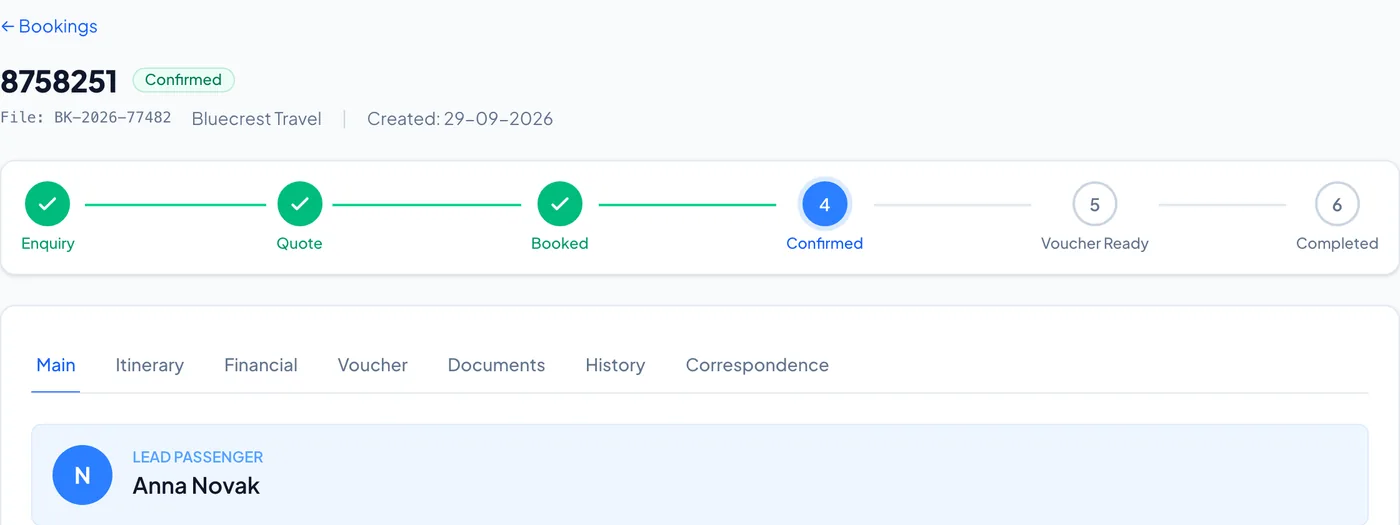
One booking, one record.From the enquiry to the voucher.
8758251
Voucher ReadyFile: BK-2026-77482
Bluecrest Travel
Enquiry
Quote
Booked
Confirmed
Voucher Ready
Completed
- LEAD PASSENGER
- Anna Novak
- HOTEL
- Kelira Hotel
- ROOM
- Double Room Garden View
- BOARD
- BB
- CHECK-IN
- 14-06-2027
- CHECK-OUT
- 21-06-2027
- CREATED
- 29-09-2026
Amend Booking
A new stay is priced again on the agency’s tariff, as a new booking made today; you see the price before you save.
Price now
2,098.00
New price
2,398.00
Difference
+300.00
Voucher
No. 8758251-V2
- LEAD PASSENGER
- Anna Novak
- HOTEL
- Kelira Hotel
- ROOM
- Double Room Garden View
- CHECK-IN
- 14-06-2027
- CHECK-OUT
- 22-06-2027
Drawn from the real screen. Names invented, figures changed.
Its status, on one line.
Enquiry, quote, booked, confirmed, voucher ready, completed.
Everything in its tabs.
Itinerary, money, voucher, documents, history and correspondence.
A change is priced first.
Price now, new price and the difference, before you save.
A new voucher for each change.
Re-issued with a new number, ready to print or download once the hotel has confirmed.
Drawn from the real screen. Names invented, figures changed.
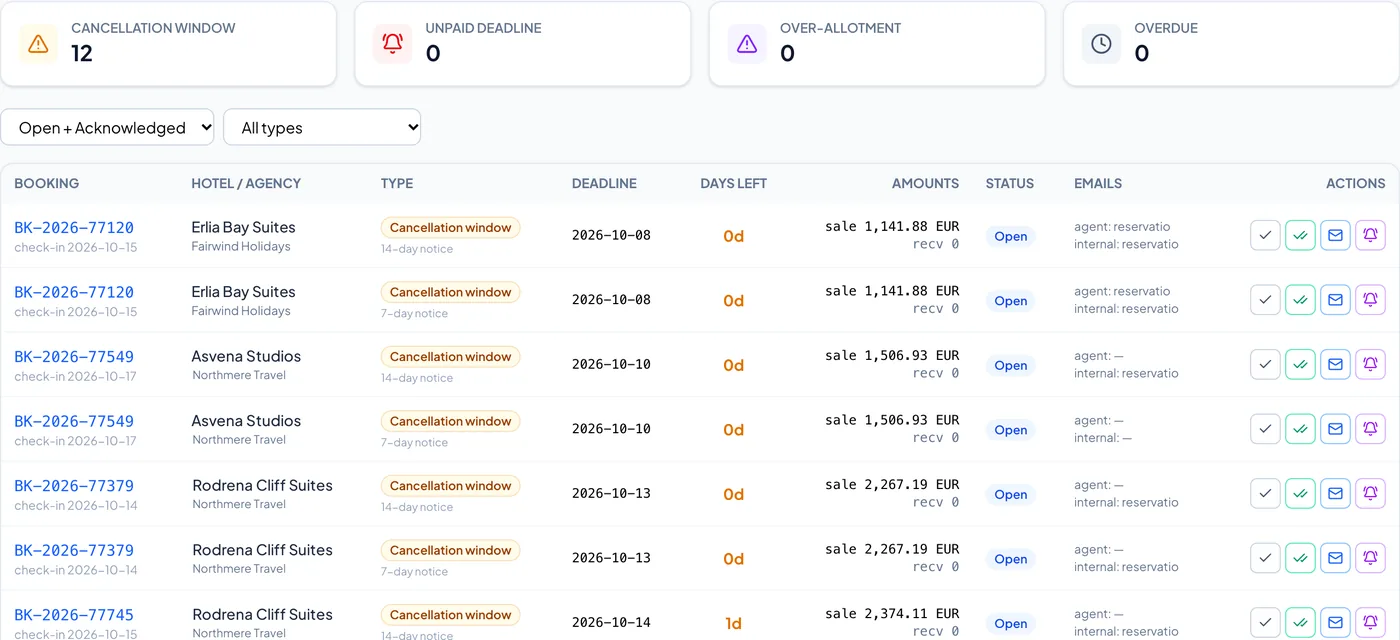
The deadlines find you.Before they cost you.
Booking Alerts
Scanned every 6 hours
CANCELLATION WINDOW
1
UNPAID DEADLINE
1
OVER-ALLOTMENT
0
OVERDUE
1
Drawn from the real screen. Names invented, figures changed.
Scanned every six hours.
Cancellation windows, unpaid deadlines, over-allotment and overdue, on one page.
A reminder in one click.
To the agent or to your own people, and the list shows it was sent.
They close themselves.
When the booking is cancelled, the guest has checked in or it is paid. If the problem comes back, the alert reopens.
Drawn from the real screen. Names invented, figures changed.
Bookings
One record from the request to the voucher.
Requests by e-mail
New e-mails from your booking mailbox are read as they arrive and open New Booking prefilled. A person checks every field. Nothing is ever booked automatically.
One record
Itinerary, money, voucher, documents, history and correspondence, all on the booking.
Amendments
Change dates, room, board or party. The stay is re-priced, availability is checked, and a prepaid agency is charged or refunded only the difference.
- Services
- Add a transfer, an excursion or an extra to a booking.
- Group bookings
- Rooms that belong together, with a rooming list and the group’s total.
- Two people, one booking
- A banner shows when a colleague is already editing a booking, so you can agree who makes the change.
The hotel sends a PDF.The contract fills itself in.
New Contract
From the PDFRead from kelira-hotel-contract-2027.pdf
Hotelpage 1
Kelira Hotel
Seasonpage 1
01-05-2027 → 31-10-2027
Roompage 2
Double Room Garden View, BB
High, per nightpage 2
124.00 €
Releasepage 3
7 days
Child age bands
Not in the PDFNothing has been saved. Check every step and save it with Save and continue.
Save and continue →Drawn from the real screen. Names invented, figures changed.
Choose the PDF.
It finds the hotel, and flags the rooms you do not have yet.
Every value shows where it came from.
The words and the page, beside the value, on every step.
What is missing is marked.
Anything not in the PDF is left for you to enter or check.
Nothing is saved until you check it.
AI helps with the parts the rules cannot read. A person has the last word.
Drawn from the real screen. Names invented, figures changed.
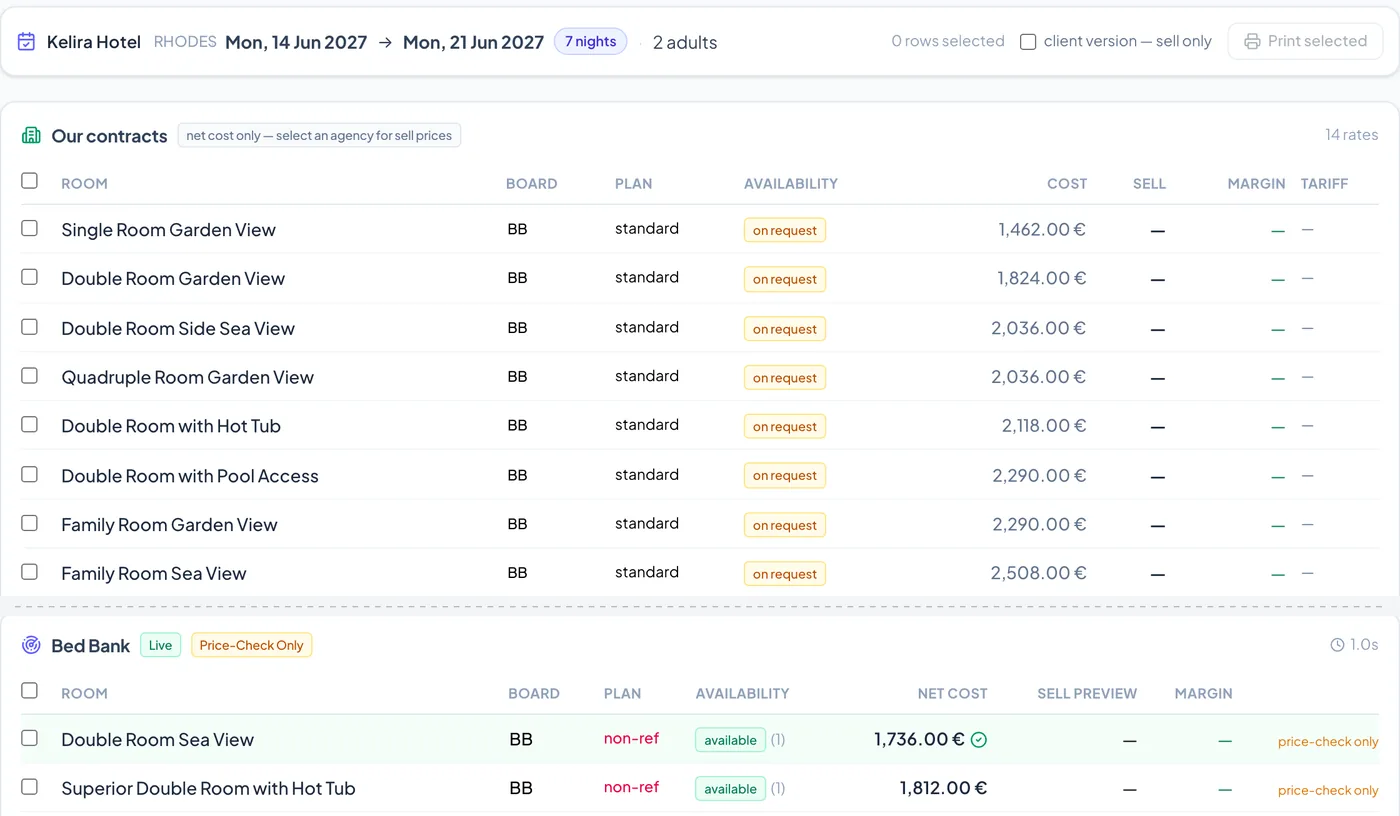
Every price comes from the contract.Next to what the market asks.
Kelira Hotel
RHODES
Mon, 14 Jun 2027 → Mon, 21 Jun 2027
Our contracts
14 rates
Bed Bank
1.0s
Drawn from the real screen. Names invented, figures changed.
Net cost, from your contract.
Every room for the dates and the party, worked out night by night.
Choose the agency.
Its sell price and your margin appear beside the cost.
Live rates underneath.
A connected supplier on the same page. Price-check only until you allow booking.
Drawn from the real screen. Names invented, figures changed.
Contracts and pricing
Load each contract once, then every price comes from it.
Entering a contract
A step-by-step wizard, or start from the hotel’s PDF: every value shows the words and page it came from, and nothing is saved until a person has checked it.
Rate periods
Up to ten dated periods per season. A stay that crosses from one into the next is priced night by night, not at an average.
Offers
Early booking, special offers and stay and pay, with their booking and travel windows. They combine the way the contract says: cumulative, consecutive or cancelling.
- Guests
- Infant and two child age bands as each contract defines them, third and fourth adults by position, and each room’s limits. A party the room cannot take is refused with the reason.
- Boards
- Supplements and reductions from a base board, with separate adult and child amounts.
- Non-refundable
- A non-refundable plan on a tariff, with its own discount and wording, offered next to the standard rate.
- Cancellation
- The contract’s wording is kept, with charge tiers where the wording is clear.
- Kickbacks
- Agreed on the contract, with thresholds. What each earned and what you claimed is followed on the hotel’s ledger.
- Drafts
- A draft prices nothing and holds no rooms. Preview its prices first, then activate it.
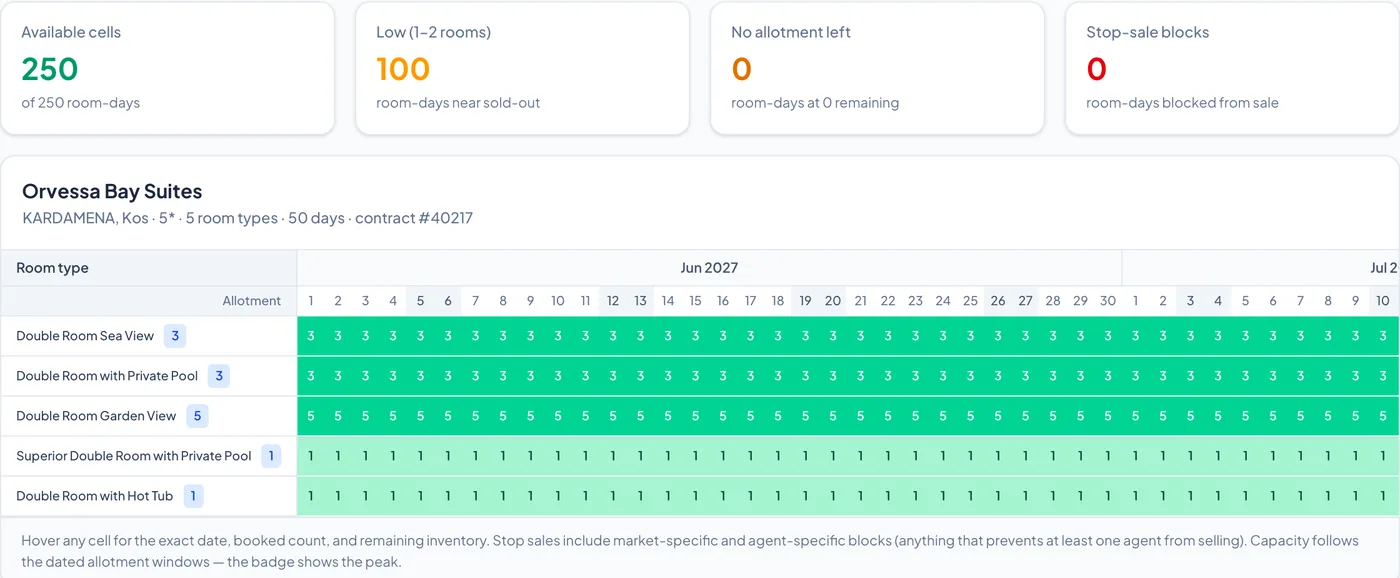
You close a hotel for a week.Everyone selling it is told.
Orvessa Bay Suites
KARDAMENA, Kos · 5* · 5 room types · 21 days · contract #40217
Available cells
69
of 105 room-days
Low (1–2 rooms)
32
room-days near sold-out
No allotment left
1
room-days at 0 remaining
Stop-sale blocks
35
room-days blocked from sale
Double Room Sea View, 2 rooms, 14 to 21 June
BK-2026-77482 ConfirmedStop sale: Orvessa Bay Suites, all room types, 14 to 20 June
12 agencies get an e-mail. 1 has none on file.
Stop sale saved
Those nights close.
12 e-mails sent
From your own account.
3 partners told
By availability event.
Every notice logged
Delivered or failed.
Drawn from the real screen. Names invented, figures changed.
Every room, every night.
Worked out from the contract, the bookings and the stop sales, at the moment someone asks.
A booking takes rooms.
The map moves with it. Nobody updates a sheet.
One stop sale closes the week.
Any room, any dates, for all agencies or chosen ones.
Everyone selling it is told.
Agencies by e-mail from your own account, connected systems by event, and every notice logged.
Drawn from the real screen. Names invented, figures changed.
Availability
Worked out from contract, bookings and stop sales together, at the moment someone asks.
Stop and open sales
Close a hotel or room for any dates, for all agencies or chosen ones. Open sales carve nights back out.
Allotments
Rooms per room type and date window, each with its release days. One pool for every agency, used up first come, first served.
Sold against contracted
Room-nights sold against contracted allotment per hotel, in the reports, from the same capacity rules the booking check uses.
- Custom allotments
- Cap one agency at its own figure for a room and period, never above the contract’s.
- Release overrides
- Change release for a period without touching the contract. The agencies concerned are e-mailed.
- On request
- Beyond the allotment or inside release, a room is offered on request with the reason shown, so your team decides.
One stay, four ways to sell it.One engine. Each person sees only what they should.
Erlia Bay Suites
14-06-2027 → 17-06-2027
Our contracts
Bluecrest TravelCOST
1,180.00
SELL
1,416.00
MARGIN
236.00
Set by the agency’s tariff, plus 20%
1,416.00 €
472.00 €/night · stay total
Prices are your agency's net-of-tariff rates.
{
"room_type": "Double Sea View",
"board": "HB",
"rate_plan": "standard",
"refundable": true,
"price_per_night": 472.00,
"price_total": 1416.00,
"currency": "EUR",
"availability": "available"
}
Double Sea View
HB
€1,475.00
€491.67/night on average
Total price for 3 nights, taxes included.
Drawn from the real screen. Names invented, figures changed.
Your desk.
Cost, sell and margin side by side, for the people allowed to see them.
Agent portal.
Agents search, book, follow and cancel inside their agreed prices and credit. Your cost and margin never appear.
Partner API.
Tour operators and platforms ask for a priced quote. Your cost, margin and commission are never in it.
Your website.
Your hotels, priced from your contracts with your markup, inside the website you already have.
Drawn from the real screen. Names invented, figures changed.
Agencies
Every agency gets the prices and the credit agreed with it, enforced at the moment of booking.
Prices
In a fixed order: the agency’s tariff, then a per-hotel rule, then its own markup. You can also hide a hotel from one agency.
Credit or prepaid
Cap an agency’s exposure at a credit limit, or run a prepaid balance that each booking debits and each cancellation refunds.
Statements
What each agency owes, with the entries behind it, on screen, as PDF or as a spreadsheet.
- Test accounts
- A partner tries everything first. Its bookings are marked as tests: never invoiced, and kept out of reports and alerts.
A new hotel, an empty page.Two stages fill it in.
Kelira Hotel
Location is setEnrichment Review
Stage 1
From Google
Stage 2
From its websiteFrom the hotel’s website
FoundKeep
FoundKeep
Nothing is applied yet.
Reads www.kelira.example
Selected to apply: Stage 1 (3 photos + 3 fields) · Stage 2 (2 photos + 4 fields)
Drawn from the real screen. Names invented, figures changed.
Stage 1: from Google.
Enrich Hotel brings in the description, contacts, address and photos Google has.
Stage 2: from the hotel’s own website.
Deep-scan reads its website for rooms, amenities, languages and more photos.
Nothing applies until you do.
Keep what you want, field by field. Save one stage, or apply everything.
Drawn from the real screen. Names invented, figures changed.
A request arrives by e-mail.It reads it. You confirm it.
Booking request
BookedFrom: reservations@northmere.example
Subject: Booking request, Kelira Hotel
Please book one Double Room Garden View at Kelira Hotel, bed and breakfast, 14 to 21 June 2027, for 2 adults. Lead guest Anna Novak.
E-mail Bookings
New e-mails from the mailbox are read and sorted as they arrive.
- Pendingread 86%
Booking request, Kelira Hotel
reservations@northmere.example
- Booked
Three rooms, Orvessa Bay Suites
groups@northmere.example
- Quarantine
Fwd: rates enquiry
info@saltline.example
Booking read from the e-mail
New Booking
Prefilled from e-mail #1042Booking BK-2026-77482
ConfirmedHotel / Supplier
RE: Booking BK-2026-77482 - Kelira Hotel
Agency
RE: Booking BK-2026-77482 - Northmere Travel
Files and received e-mails
Received, from reservations@northmere.example
DownloadDrawn from the real screen. Names invented, figures changed.
It arrives by itself.
New e-mails from your booking mailbox are read and sorted as they arrive.
Every detail, with its words.
Hotel, dates, room and party. What could not be read is marked.
One click to a prefilled booking.
Check each field and confirm. Nothing is ever booked automatically.
Every e-mail stays on the booking.
What you send to the hotel or the agency, with its files, and the replies you attach. One tab, one record.
Drawn from the real screen. Names invented, figures changed.
Transfers and excursions
The services sold on a booking, planned on the day they happen.
Daily transfers
Daily Operations plans each day’s transfers by flight: guests on the same flight whose hotels are near each other share a vehicle. Private transfers ride alone.
Excursions
A catalogue with rates by age band and group size, weekly schedules that make departures, a daily sheet and manifests for each operator.
After confirming
Bookings added, cancelled or moved wait for your approval, and nothing prints while changes are waiting, so a driver never gets an out-of-date sheet.
- Prices and costs
- Buy and sell prices per zone and vehicle, with each run’s cost shown only to those allowed to see it.
- A departure cancelled
- Cancel it or move its guests to another departure. Any notice that could not go out waits in one list, Notices not sent.
Accounting baked into the bookings.It sees what a stand-alone program can’t: the booking, the contract, the cost.
Invoice
Hotel invoice
Ledgers
Journal
Sales invoice for services
Transmitted to AADEF-2027-0142
From booking BK-2026-77482
- MARK Number
- 400001000000142
- UID
- 7C1D…A04C
- Authentication code
- 3F9B…12E0
- Accommodation services, three nights
- 504.00
Check what was read
Read from image, 1 pageHotel ledger
Kelira HotelBookings
14
Contract cost
25,536.00
Invoiced
18,240.00
Paid
12,160.00
Balance
6,080.00
Overdue
0.00
Agency ledger
Export for your accountant
Every entry balancesDrawn from the real screen. Names invented, figures changed.
Invoice from the booking.
Gap-free numbers and credit notes, tied to the booking they came from. They reach myDATA through a certified provider once your live access is issued.
Cost control on every hotel invoice.
A PDF, a photo or a scan is read for you and compared with your contract cost. More than €1 out, either way, and it is flagged.
Every balance, in one place.
Agency and hotel ledgers, statements and a season check: invoiced, paid and owed, booking by booking.
A journal your accountant can load.
A chart of accounts, periods that lock, and entries that balance to the cent, in a file their program imports.
Drawn from the real screen. Names invented, figures changed.
How is the season going?Open Reports and see.
Reports
Analytics and business intelligence
- Overview Dashboard
- Hotel Performance
- Revenue & Profitability
- Booking Statistics
- Agency Performance
- Transfer Reports
- Occupation & Availability
- Activity & Audit
- Cost Analysis
Total Revenue
€0.00M
Season 2027
Total Bookings
0
Season 2027
Total Pax
0
2.5 pax/booking avg
Guest Nights
0
6.6 nights avg stay per booking
Revenue trend
May
Jun
Jul
Aug
Sep
Oct
Hotel Performance
Season 2027
Revenue, cost and margin per month
May
Jun
Jul
Aug
Sep
Oct
Margin trend
20.6%Drawn from the real screen. Names invented, figures changed.
The whole season at a glance.
Revenue, bookings, pax and guest nights, read from the live data when you open the report.
Which hotels earn, and which do not.
A ranking with bookings, guest nights, revenue, occupancy and margin.
Revenue, cost and margin.
Month by month, with the margin trend. Only for the people allowed to see money.
Out as a spreadsheet or a PDF.
Every report exports to CSV or PDF.
Drawn from the real screen. Names invented, figures changed.
Reports
Read from the live data when you open them.
The views
Overview, hotel and agency performance, revenue and profitability, booking statistics, transfers, occupation, cost analysis, activity and audit.
Honest figures
A dash means a figure could not be loaded or your role cannot see it. A 0 is a real zero. A missing cost is shown as missing, never counted as nothing.
Exports
Every report exports to CSV or PDF.
Stay competitive.Yield Intelligence shows you where you stand.
Yield Intelligence
Worked out every 12 hours
14 to 21 June 2027, 2 adults
Anomalies
Tariff below cost
A tariff sells a room under its contract cost
Stop sale in demand
Sales closed on nights that sold last year
Contract above market
Your net is above live supplier rates
Pickup spike
Bookings arriving faster than usual
Cancellation spike
Needs dated cancellations
Recommendations
Renegotiate net rate
Kelira Hotel, Double Room Garden View
Ask for more allotment
Orvessa Bay Suites, July
Ask to reopen sales
Erlia Bay Suites, 14 to 20 June
Nothing here changes a price, an allotment or a contract.
Drawn from the real screen. Names invented, figures changed.
Your net against the market.
Against live supplier rates, for the hotels and dates you choose.
Demand you can see coming.
A pickup forecast per month, with its method and its confidence.
Anomalies, with their reasons.
Each comes from a stated rule, with the rows it fired on.
You decide.
Accept or dismiss each recommendation. Nothing here changes a price, an allotment or a contract.
Drawn from the real screen. Names invented, figures changed.
New on the team?Ask the screen.
Availability Blocks Timeline — 2027
Stop Sales is in the menu under Availability.
- Click + Stop Sale
- Choose the hotel, rooms and dates
- Check the yellow box and save
From your own contracts. It never guesses a price.
Drawn from the real screen. Names invented, figures changed.
Ask in your own words.
In English or Greek, on any page.
It names the page and the steps.
Then it takes you there.
It rings the button to press.
Training happens on the real screen, at the moment it is needed.
It knows your hotels too.
Booking AI suggests from your own contracts, with real prices. It never guesses one.
Drawn from the real screen. Names invented, figures changed.
People and the assistant
Everyone sees what their work needs.
The assistant
Answers “how do I” questions in English or Greek, and takes you to the page. It never saves, sends or deletes anything. Its Booking AI tab suggests hotels from your own contracts with their real prices, and never guesses one.
Roles
Six built-in roles and your own, with a switch per permission and exceptions for one person.
Costs and margins
Without the permission they are left out of the data the page receives, not only hidden on screen.
- Sign-in
- Two-factor sign-in, which a company can require for all staff. Five wrong tries lock an account for 15 minutes.
- In your language
- The app switches between English and Greek. The Greek translation is still in progress and some pages remain in English.
APIs in and out.Nobody retypes anything.
Your partner’s system, on a test account first.
POST /dmc-hook
X-DMC-Event: booking.confirmed
X-DMC-Event-Id: evt_5f0c6a2e9b1d4c8e8a7f3b2d1c0e9f8a
X-DMC-Signature: t=1810116902,v1=6a1f…c93e
{
  "id": "evt_3a9d1c7e5b2f4a68b0c4e7d19f2a6c31",
  "type": "availability.changed",
  "api_version": "v1",
  "created_at": "2027-05-12T09:12:44.820Z",
  "data": {
    "hotel_id": "1752",
    "hotel_name": "Erlia Bay Suites",
    "from": "2027-06-14",
    "to": "2027-06-20",
    "room_type": null,
    "reasons": ["stop_sale"]
  }
}Source Strategy
Drawn from the real screen. Names invented, figures changed.
In: partners search and book.
Eighteen documented operations, and a test account first.
Out: every change, signed.
Bookings, availability, prices and hotels, as events within seconds.
Suppliers beside your contracts.
Live rates to compare, and to book when you allow it.
Drawn from the real screen. Names invented, figures changed.
Where it runs
Nothing to install. An ordinary web browser, in the office or away from it.
Your own database
Each company’s contracts, bookings and invoices live in a database of their own, not in rows shared with other customers.
In the EU
Hosted in a North Europe data centre, inside the EU.
Yours to take
All your company’s data can be downloaded, a year at a time.
- Supplier credentials
- Each company’s are encrypted and never shown back in full.
One day in June.Most of it happens before anyone asks.
Parity check
To review
File 0412: check-out 18-06-2027 ≠ 17-06-2027
Booking Alerts
Scanned every 6 hours
Bluecrest Travel
Credit Facility
Used
18,420.00
Credit Limit
20,000.00
Available
1,580.00
Special Offers
Sales invoice for services
From booking BK-2026-77482
E-mail Bookings
Recommendations
Yield Intelligence
Nothing here changes a price, an allotment or a contract.
A made-up day, with sample figures.
04:00. The overnight check is done.
While you run it next to a connected system, it compares every booking for the next 30 days and lists each difference.
06:00. The morning list wrote itself.
Bookings at risk, with the days left. When the risk is gone, the alert closes itself.
09:40. Over the credit limit, it stops itself.
An agency’s credit is checked at the moment of booking. Nothing goes through, and the screen says why.
11:20. A new offer reaches partners in seconds.
When an offer, a price or availability changes, connected systems are told. Nobody has to keep asking.
16:30. The invoice reports itself.
Set to Automatic, it goes to myDATA through a certified provider and the MARK comes back. Switched on once your live access is issued.
22:00. And what it never does by itself.
Nothing is booked automatically. Yield Intelligence changes no price, allotment or contract. It warns, and a person decides.
A made-up day, with sample figures.
Take a closer look.
The real screens. Names invented, figures changed.
- DMC Connect
Rate SearchYour contracts and live supplier rates, on one page. - DMC Connect
One booking, one recordFrom enquiry to voucher, with money, documents and correspondence. - DMC Connect
Booking AlertsCancellation windows and unpaid deadlines, before they bite. - DMC Connect
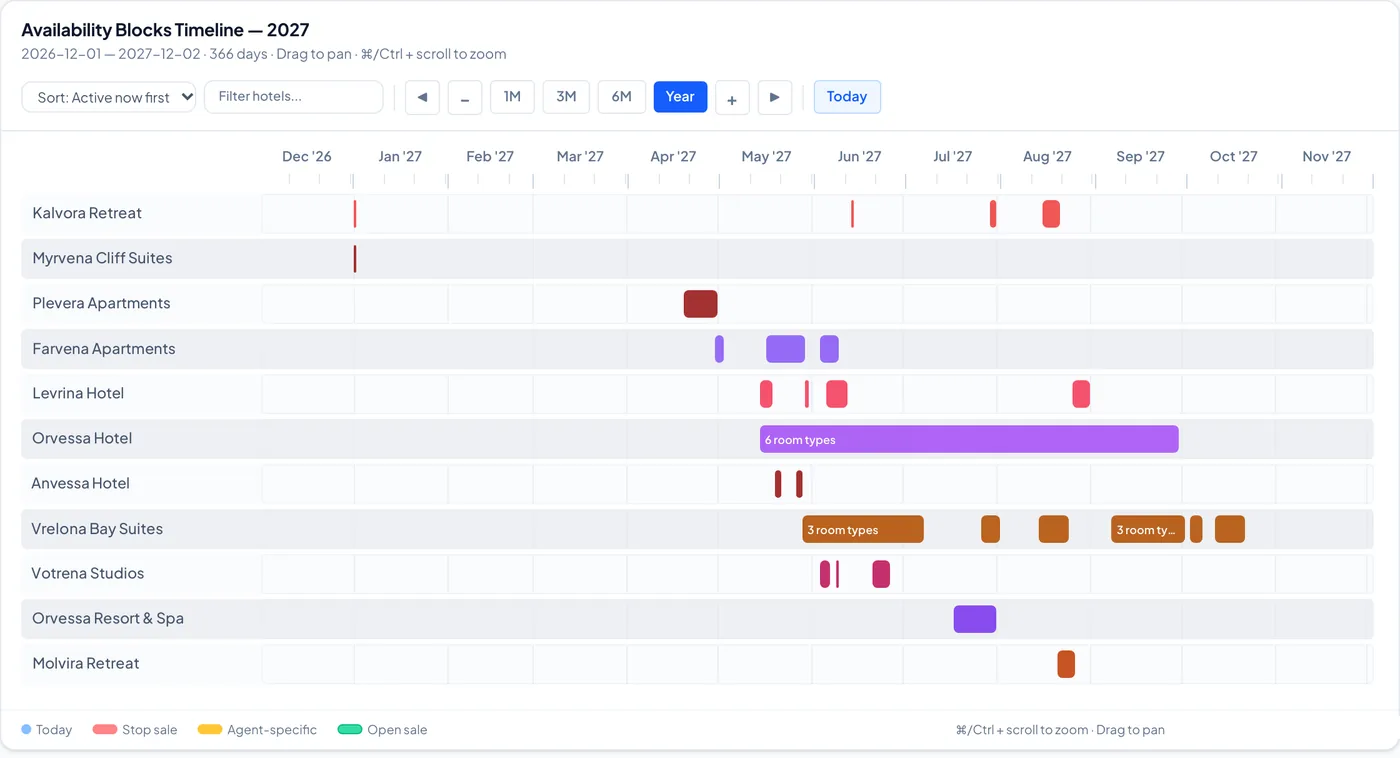
Stop SalesEvery block of the year on one timeline. - DMC Connect
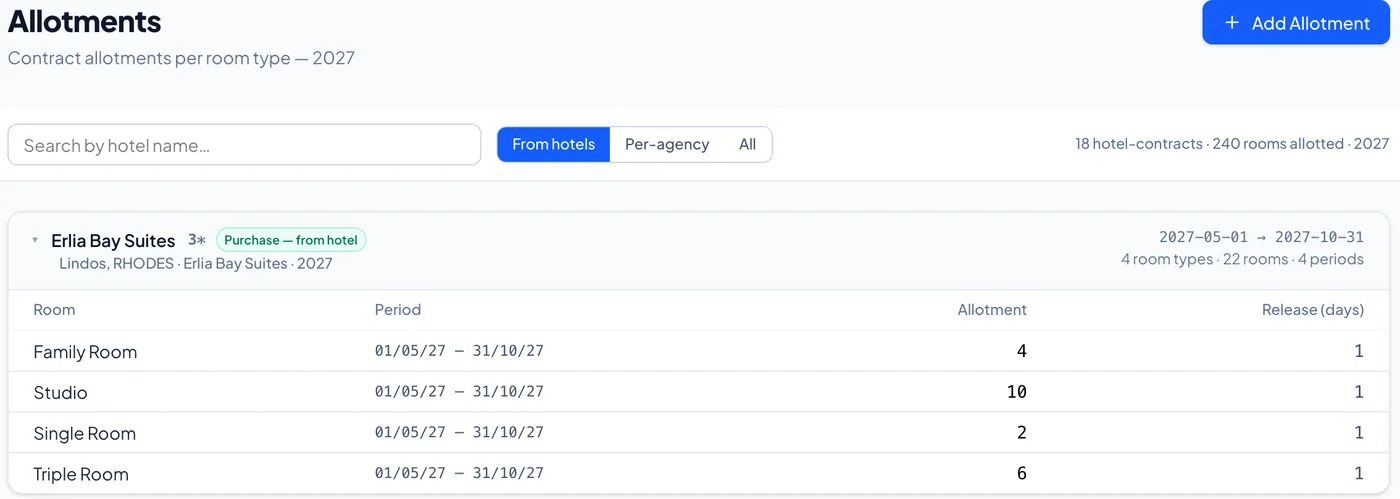
AllotmentsFrom hotels, per agency, or all together. - DMC Connect
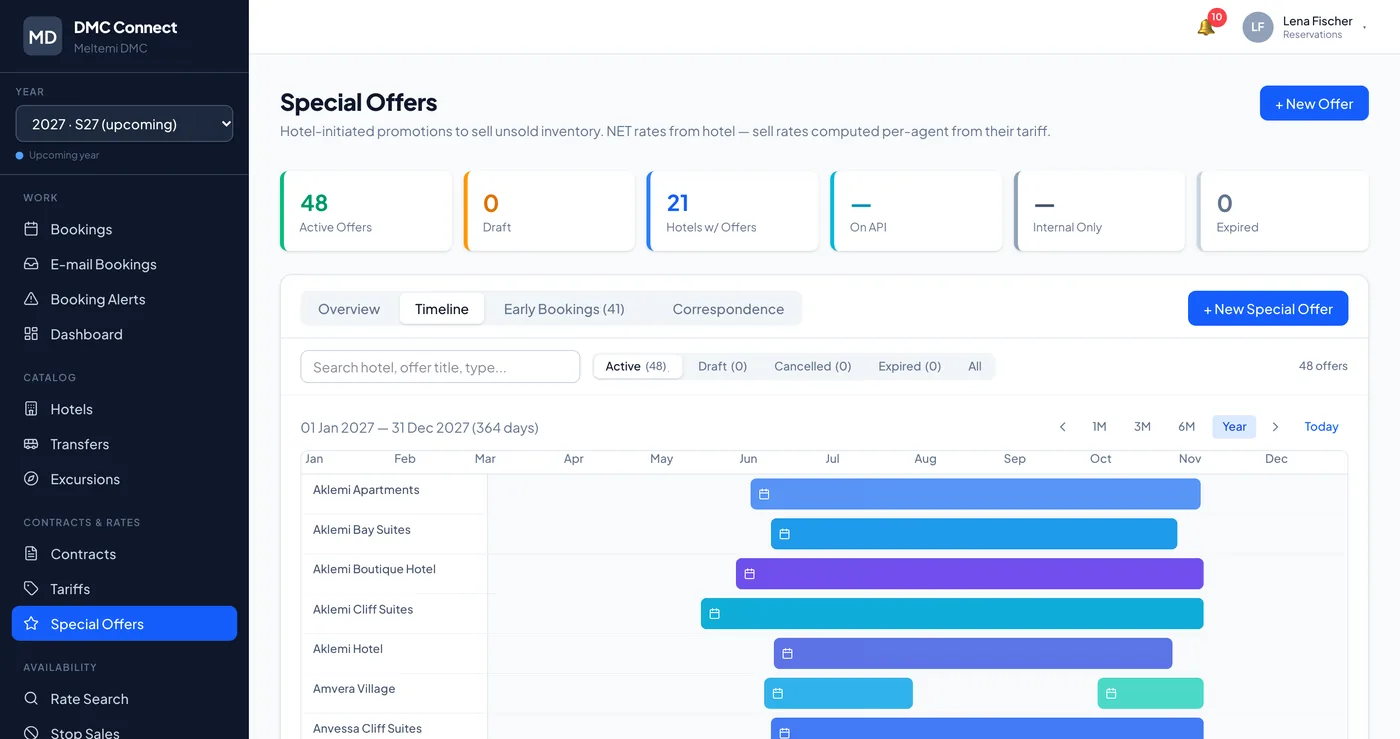
Special OffersThe year’s offers per hotel, on one timeline.
Run it next to what you have.Switch when the numbers agree.
Import
Your hotels, contracts and bookings come across.
Compare
Your team keeps working as today while the figures are compared.
Switch
When the figures have matched for long enough, you move.
See the real product.
A walkthrough of the working software, with your questions. Write in Greek or English.
Ask for a walkthroughDesigned by a software architect with more than 20 years on complex systems in the UK.